
Product Advisor is an AI-powered module designed for e-commerce assistants.
It acts as an intelligent shopping guide that understands customer needs, asks clarifying questions, and recommends relevant products directly from your product feed.
Use it to create conversational experiences that go beyond simple keyword search — the Product Advisor helps users discover, compare, and buy through natural dialogue.
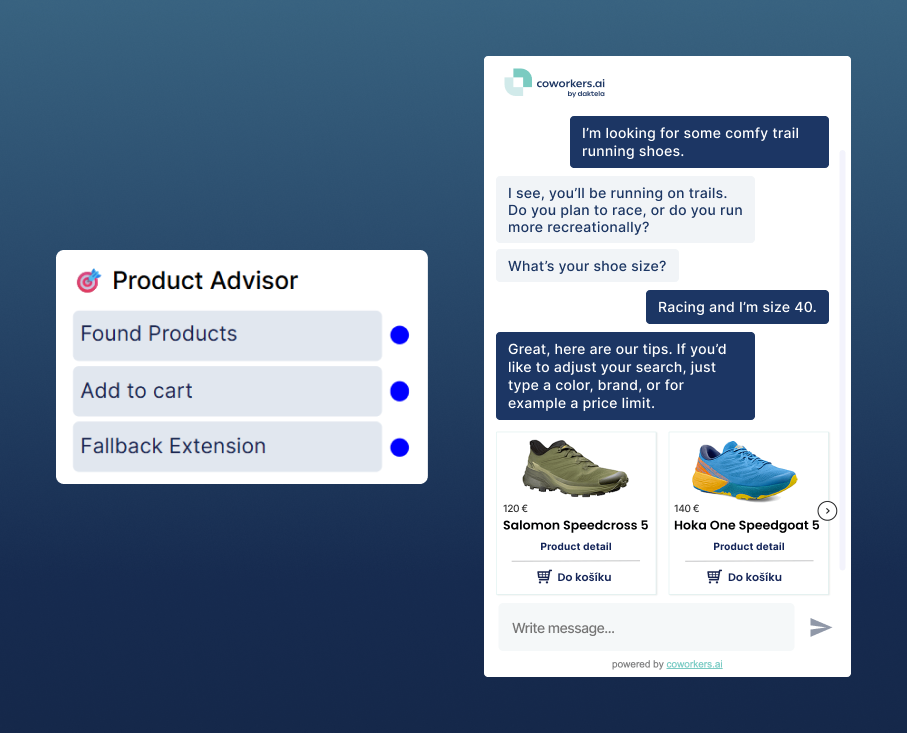
💡 What It Does
The Product Advisor combines LLM reasoning with product data to handle three main scenarios:
-
Answering questions about a product
The customer asks a question about a specific product.
→ The bot locates it (or asks for clarification) and answers using product data such as description, price, or parameters from your product feed.
→ If data is missing, the bot could escalate to a fallback (human operator, form, etc.). -
Recommending a product
Example: “I’m looking for trail running shoes.”
→ The bot identifies the category (Running Shoes).
→ Asks clarifying questions (size, type, purpose).
→ Presents personalized product recommendations. -
Searching for a product
Example: “Show me running shoes, size 42, under €100.”
→ The bot builds a structured search query.
→ Displays results in a carousel.
→ If nothing is found, it triggers the fallback path.
🧠 How It Works
The module uses a multi-agent architecture where several specialized agents collaborate.
Each agent has its own role and editable instruction prompt, allowing full customization of behavior.
Example:
When a user asks something like “I’m looking for waterproof running shoes, size 40”,
the Product Advisor coordinates several agents automatically:
-
The Triage Agent identifies what the user wants (search, recommend, ask).
-
The Advisor or Search Agent finds suitable products.
-
The QnA Agent answers any detailed questions.
-
If the user wants to compare or buy, the Compare or Add-to-Cart Agent steps in.
Each agent’s behavior can be customized using instruction prompts directly inside the module.
✅ Next Steps
-
Prepare and connect your product feed → Product Feed Setup
-
Set module prompts and settings Module settings