
The Dashboard gives you a quick, visual summary of your bot’s performance adjusted to the selected channel (Chat, Voice, or Mail).
While the layout is mostly the same, some statistics differ based on what’s relevant for each channel.
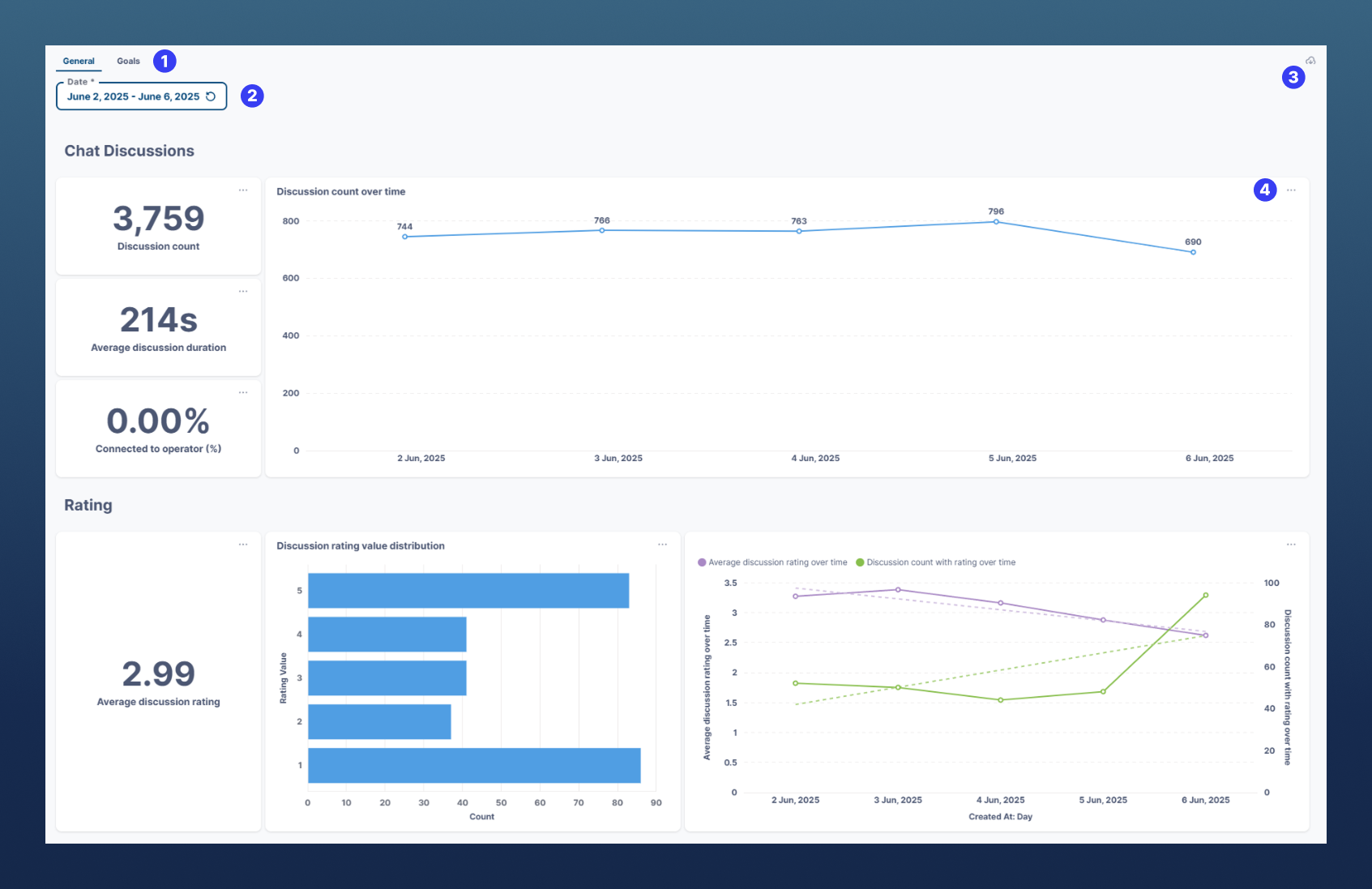
🔍 Interface Overview
-
Dashboard Tab Picker – Switch between:
-
General - Default view showing overall performance metrics.
-
Goals – Displays trends for any Goals set in the Dialog Builder.
-
(Custom widgets are possible. Please contact support.)
-
-
Date Picker - Select a custom time range to view data trends.
-
Download Current View (PDF) - Export the entire visible dashboard as a PDF report.
-
Section Export Button - Each widget has its own export option (.csv, .xlsx, .json, .png).
📈 Sections & Metrics
Discussions
-
Discussion Count – Total number of chats in the selected period.
-
Average Duration – How long chats lasted on average.
-
% Connected to Operator – Percentage of chats redirected to an operator (via "Redirect to Operator" module).
-
Trend Graph – Discussion volume over time.
Differences by channel:
-
Email – Shows mail counts, action breakdown (bot reply, operator template, forward), and processed email count over time.
-
Voice – Shows call count, average user replies per one call, total and average call duration, % of calls redirected to operator (via "Redirect to Operator" module), plus two trends over time (call count & call duration per call).
Rating (Chat only)
-
Average Rating – 1 (lowest) to 5 (highest).
-
Distribution Graph – How many ratings were given for each score.
-
Trend Graph – Average rating & number of rated discussions over time.
AI Credits
-
Pie chart – Distribution of credits among LLM modules used in your Dialogs.
-
Daily trend – Usage per module over time.
LLM Modules
-
LLM Intents – Outputs breakdown (in %) of your LLM Intent modules (combined if multiple modules are used).
-
LLM CallSteer – Outputs breakdown (same logic as LLM Intents statistics).
AI Knowledge (RAG)
-
Success Rate – % of questions answered vs. not answered.
-
Source Breakdown – Manual entries, uploaded files, online sources, etc. used when successfully answering a question.
-
Answer Rating – Thumbs up/down from users on AI Knowledge output messages (rating must be enabled in AI Knowledge module).
-
Top Sources Used – Most frequently referenced documents or entries.
Use the Dashboard not only to monitor usage but also to identify opportunities for optimization such as improving unanswered questions, balancing operator load, or refining intents.
Do not forged to combine together with Goals or Dialog Flow view (in Chat/Calls/Mails view)